
Setting Up Google Antigravity: Installation and Configuration
Model Selection and Initial Configuration
Understanding the Dual Interface System
Workspace Configuration and Agent Settings
Real-World Applications: How Antigravity Handles Development Tasks
Full-Stack Feature Development
Autonomous Code Validation and Testing
Browser-Based Application Testing
Artifacts: A Different Approach to Development Review and Collaboration
Architectural Differences: How Antigravity Separates from Traditional AI Coding Tools
Autonomous Operation vs. Prompt-Response Cycles
Multi-Agent Workflow Capabilities
Knowledge Retention and Learning Integration
Assessment and Recommendations
How Google Antigravity Makes AI-Assisted Coding Actually Work for Developers


The software development industry continues to evolve with AI-powered tools that aim to support developers in their daily work. Google Antigravity, currently available in public preview at no cost for individual users, represents a different approach to AI coding assistance.
What sets this tool apart from traditional AI coding assistants? The answer lies in its architecture and approach to developer workflow integration. Rather than focusing solely on code completion or snippet generation, Antigravity attempts to function as an independent development agent.
This analysis will examine the practical setup and configuration of Google Antigravity, evaluate its performance on real-world development tasks, and assess how its artifact system addresses common challenges in AI-developer collaboration. We will also compare its approach to existing AI coding tools to understand where it fits in the current landscape of development assistance technologies.
Setting Up Google Antigravity: Installation and Configuration
 Getting started with Google Antigravity involves a straightforward installation process followed by several configuration decisions that will shape your development experience. The platform provides installers for Windows, macOS, and Linux operating systems, which you can download from the official Google Antigravity website. During the current preview period, you'll need to authenticate using a personal Gmail account.
Model Selection and Initial Configuration
The setup wizard guides you through the initial configuration process, including the option to import existing VS Code settings or create a fresh environment. You can customize your preferred theme during this stage before proceeding to one of the most important decisions: model selection.
Gemini 3 Pro serves as the default model, but the platform supports additional options including Anthropic's Claude Sonnet 4.5 and OpenAI's GPT-OSS. This flexibility allows developers to select the AI model that best fits their coding preferences and project requirements without vendor lock-in constraints.
Understanding the Dual Interface System
Antigravity presents two distinct working modes, each designed for different development approaches:
- Editor View: Functions as a familiar IDE environment enhanced with AI capabilities. This mode includes tab autocompletions, natural language code commands, and an AI agent accessible through the sidebar. Developers who prefer traditional coding workflows will find this mode intuitive and accessible.
- Manager View: Google describes this as "mission control" for coordinating multiple AI agents across different workspaces simultaneously. This mode represents a fundamental shift in development methodology, positioning AI agents as collaborative team members rather than simple assistive tools.
The interface allows seamless switching between these modes using buttons in the top-right corner or the keyboard shortcut Cmd+E.
Workspace Configuration and Agent Settings
After completing the initial setup, you can open a workspace folder using a process similar to VS Code. However, effective collaboration with AI agents requires configuring two critical settings:
First, select the appropriate planning mode for your agent. "Planning" mode works best for complex tasks that require thorough analysis and research, while "Fast" mode handles simpler, localized tasks more efficiently.
Second, configure the agent's operational parameters through the "Terminal Execution Policy" (Off/Auto/Turbo) and "Review Policy" (Always Proceed/Agent Decides/Request Review) settings. These configurations determine the level of autonomy your AI agent will have and when it will seek your approval for actions.
These configuration choices establish the foundation for your development workflow and determine how the AI agent will interact with your projects and decision-making process.
Real-World Applications: How Antigravity Handles Development Tasks
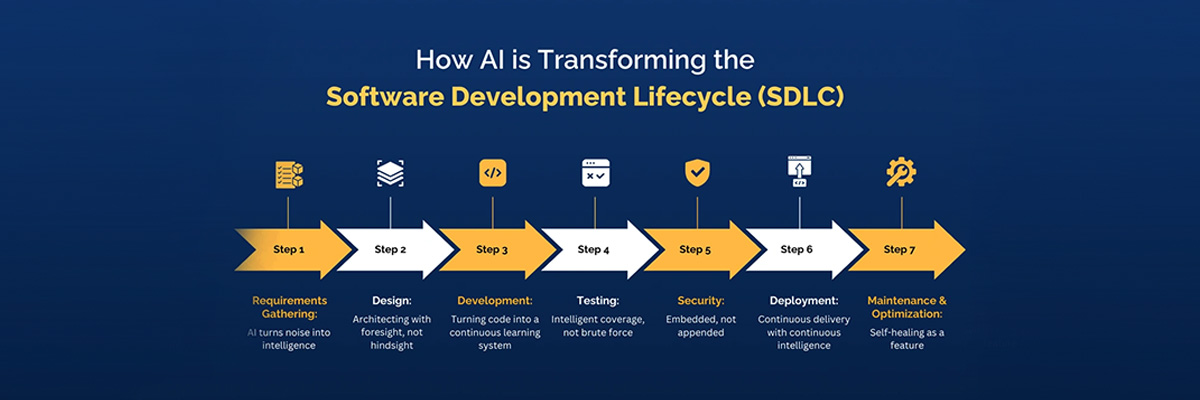 How does Antigravity perform when applied to actual development scenarios? The platform addresses a fundamental challenge in modern software development: the constant context switching required to move between different tools, environments, and testing phases. Rather than operating as a code suggestion tool, Antigravity functions as an autonomous development agent capable of executing complete workflows.
Full-Stack Feature Development
Antigravity enables developers to delegate entire feature implementations that span multiple system components. The agent operates independently across development environments—editor, terminal, and browser—without requiring step-by-step supervision. Consider the development of a task management application where requirements include:
- Database schema design and backend API configuration
- Frontend user interface implementation using specified frameworks
- Authentication systems with proper validation logic
The workflow begins with the agent analyzing requirements and generating an implementation plan. Once approved, the agent executes tasks in logical sequences: establishing backend infrastructure, implementing data models, creating API endpoints, developing frontend components, and integrating authentication flows. The agent maintains architectural consistency throughout the process, applying proper separation of concerns and following established design patterns.
Autonomous Code Validation and Testing
Code verification presents another area where Antigravity demonstrates practical value. After implementing features such as user registration systems, the agent automatically generates test suites covering functional requirements, edge cases, and error handling scenarios. The testing process operates independently, validating code functionality without developer intervention.
The agent's ability to work across multiple workspaces simultaneously creates opportunities for parallel development workflows. Different agents can handle separate features, bug fixes, or testing procedures concurrently, effectively multiplying development throughput.
Browser-Based Application Testing
Perhaps most significantly, Antigravity includes browser automation capabilities for testing web applications. The system launches dedicated Chrome instances, navigates to development sites, and interacts with user interface elements to verify functionality. This automated testing generates verification artifacts including screenshots, interaction recordings, and detailed test reports.
During form validation testing, the agent automatically populates input fields with test data, submits forms, and verifies expected responses. The testing extends to edge cases: invalid email formats, password mismatches, and other error conditions. When issues are discovered, the agent returns to the codebase, implements fixes, and re-runs tests to confirm resolution.
This ai assisted software development approach connects code implementation directly with functional verification, creating a more complete development cycle that extends beyond traditional code generation tools.
Artifacts: A Different Approach to Development Review and Collaboration
Traditional AI coding tools present developers with a familiar dilemma: either they overwhelm users with verbose API logs that reveal little actionable information, or they operate as impenetrable black boxes that provide results without context. Antigravity addresses this challenge through its artifact system, which generates structured, human-readable documentation that bridges the communication gap between developer and AI agent.
- Task Documentation and Verification Processes: The artifact system produces verifiable work documentation at appropriate abstraction levels. Rather than forcing developers to parse technical logs, the system generates task lists that outline planned implementation steps, detailed implementation plans that specify changes before execution, and comprehensive walkthroughs that document completed work. This documentation approach enables developers to verify the AI's reasoning and logic without requiring deep technical analysis of each step.
- Interactive Feedback Integration: Developers can provide feedback using a commenting system similar to collaborative document editing platforms. You can select specific text sections or visual elements within any artifact and attach targeted feedback. The AI agent processes this feedback and incorporates changes without disrupting its current workflow—making adjustments while continuing to maintain development momentum. This feedback loop creates a more efficient review process compared to traditional stop-and-restart approaches.
- Visual Evidence Over Raw Technical Data: We should acknowledge that dense API call logs provide little value to developers seeking to understand what actually occurred during code execution. Antigravity's artifact system generates concrete evidence including screenshots, browser interaction recordings, test execution results, and visual confirmations that demonstrate the tangible outcomes of abstract code changes. This approach offers developers concrete proof of functionality rather than requiring them to interpret raw technical logs, creating a more transparent and verifiable development process.
Architectural Differences: How Antigravity Separates from Traditional AI Coding Tools
The architecture behind Google Antigravity differs fundamentally from existing AI coding assistants. While most current tools operate as reactive suggestion engines, Antigravity positions itself as an autonomous development agent with distinct operational principles.
Autonomous Operation vs. Prompt-Response Cycles
Traditional AI coding tools function through request-response interactions. Developers pose questions, receive suggestions, and manually implement changes before proceeding to the next step. This pattern creates bottlenecks and requires constant human intervention.
Antigravity operates differently. The platform functions as an "agent-first" system where AI agents plan, execute, validate, and iterate through development tasks with minimal supervision. This architectural choice transforms the developer's role from implementer to strategist. Instead of writing individual functions, developers define project objectives and system requirements while agents handle the technical execution.
Multi-Agent Workflow Capabilities
Perhaps the most significant advancement lies in Antigravity's ability to manage multiple agents across separate workspaces simultaneously. Developers can assign different agents to work on various features, bug fixes, or testing scenarios concurrently. Each agent maintains its own context and workspace, enabling true parallel workflows that linear chat interfaces cannot support.
This capability addresses a common limitation in traditional development workflows where context switching between different tasks reduces overall productivity. With multi-agent orchestration, teams can maintain focus on multiple priorities without losing momentum.
Knowledge Retention and Learning Integration
Unlike conventional AI assistants that treat each interaction independently, Antigravity implements persistent learning mechanisms. Agents save useful context, code patterns, and project-specific knowledge to a centralized knowledge base. Over time, this creates increasingly effective assistance tailored to specific project architectures and team preferences.
This approach eliminates the repetitive explanation cycles common with other AI tools, where developers must repeatedly provide context for similar tasks across different sessions.
Assessment and Recommendations
Google Antigravity presents a different approach to AI-assisted development that addresses several limitations found in traditional coding assistants. Our analysis reveals three key areas where this tool distinguishes itself from existing solutions.
The artifact system represents the most significant advancement, providing developers with structured, reviewable evidence of AI work rather than raw logs or hidden processes. This addresses a common trust issue in AI development tools where developers struggle to understand what actions the AI has taken and why.
The parallel workspace capability offers practical benefits for development teams managing multiple features or bug fixes simultaneously. Rather than sequential task completion, developers can deploy multiple agents across different projects, potentially improving overall throughput for certain types of work.
However, the effectiveness of these features depends heavily on project complexity and team structure. Simple projects may not benefit from the additional overhead of agent orchestration, while complex enterprise systems might require more sophisticated coordination mechanisms than currently available.
At SDH, we support businesses and technical teams in navigating this new era of AI-powered development. Whether you're integrating agentic tools like Google Antigravity, optimizing engineering workflows, or building scalable AI-enabled systems, SDH provides:
-
Strategic guidance on selecting the right AI development tools for your project needs
-
Implementation support for integrating new agent-based workflows into existing pipelines
-
Process optimization to help teams adopt distributed, autonomous development practices
-
Technical consulting and training to ensure your developers can leverage AI effectively and safely
Our mission is to help companies stay ahead of the curve by adopting intelligent, future-ready technologies that enhance productivity, reduce operational barriers, and accelerate innovation.
If you're ready to explore how modern AI-driven development tools can elevate your engineering capabilities, SDH is here to guide you every step of the way.
Reach out to us today at sdh.global and discover how we can help you unlock smarter, faster, and more efficient development workflows.
Categories
About the author

Business Analyst at Software Development Hub. A solution-driven and result-oriented business analyst with a strong academic background in Computer science and Cybersecurity. Capable of communicating effectively with complex, cross-functional, and geographically distributed stakeholders and teams. Resourceful, hard-working, and ambitious team player.
Share





Need a project estimate?
Drop us a line, and we provide you with a qualified consultation.